

In Procee, it is possible to export data to external systems such as BI tools, or automation platforms by using Saved Searches with Public Links.
This feature allows external systems to retrieve structured data from Procee without requiring a complex API integration.
How It Works
1. Create a Saved Search
Navigate to any list screen in Procee (for example: Purchase Orders, Invoices, Vendors, etc.).
Apply the relevant filters and then save the search.
2. Enable the Public Link
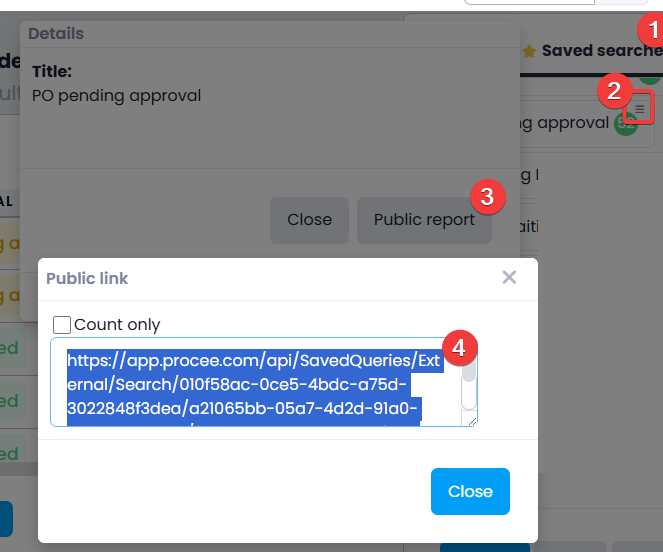
When opening the saved search, a system administrator can enable a Public Link.
Once enabled, Procee generates a unique URL that returns the results of the saved search.
This link can then be used by external systems to retrieve the data.
3. External System Retrieves the Data
The external system can periodically call the generated URL to retrieve the data.
Example:
Notes:
- When accessing the report for the first time, a Processing record will be returned.
- After a few seconds of processing, the link will return the report results.
- Once every hour the report cache is cleared. In order to retrieve updated data, the link must be called again.
- If the link is called during the last 5 minutes of the hour, the report will refresh immediately without returning a Processing record in between.
- Each page of the report contains up to 500 records.
To retrieve additional pages, update thepageNumparameter at the end of the URL to the desired page number (the default value ispageNum=1). - When a page returns fewer than 500 records, it indicates that there are no additional records available.